
Madaar

One Platform For Every Part Of Your School

Student records, academics, fees, staff, campus operations, communication, reports, and school setup stay on one record.

Book A DemoBook A Demo

Students & Admissions

Enrollment, family contacts, daily class life, and the path from applicant to student.

Student Records

The directory the rest of the school reads from.

  • Student Profiles
  • Guardians and Parent Accounts
  • ID Cards, Promotions, and Transfers

Pre-Registration

Applications come in before the student is enrolled.

  • Admission Applications
  • Admission Test Syllabus
  • Enrollment onto the Student Record

Attendance

The class mark is the record the office and parents use.

  • Class-wise Daily Attendance
  • One Mark for the Office
  • Parents see the Same Day

Homework

What was set in class reaches the family from the same place.

  • Assign Homework
  • Track what was set
  • Share it with parents

Academics

Exams, results, lesson planning, timetables, and assembly.

Exams & Results

From the term and the paper through to the mark.

  • Terms, Exams, and Schedules
  • Date Sheets and the Question Bank
  • Marks, Results, and Board Results

Lesson Plans

Planning and class assessments sit with the subject.

  • Teacher Lesson Plans
  • Class Assessments
  • Kept with the Class for the Term

Timetables

The bell, the subject, and the teacher in one timetable.

  • Period Timings
  • Subjects and Teachers in Each Slot
  • Substitutions and Class or Teacher Views

Assembly

Morning assembly has a format, an order, and a schedule.

  • Assembly Types
  • Order of Items
  • Who Presents, and When

Finance

What students pay, how money is collected, and the school ledger.

Fee Management

Charges, concessions, and vouchers stay on the student.

  • Fee Heads, Discounts, and Concessions
  • Vouchers and Recorded Payments
  • A Collection Summary

Accounting

The school ledger sits beside fee collection.

  • Chart of Accounts and Banks
  • Vouchers, Ledger, and Daybook
  • Statements and the Balance Sheet

Online Fee Collection

Digital invoices go out through online fee collection, and payments come back onto the fee.

  • Online Fee Collection
  • Students on Digital Invoices
  • Invoice Status and Payment Callbacks

Staff, HR & Payroll

People, attendance, leave, and how staff are paid.

Staff Records

The employee directory, from hiring through to the role they hold.

  • Employee Directory
  • Job Applicants
  • Designations and Pay Grades

Leave

Leave types are defined once, then requested and approved on the staff record.

  • Casual, Sick, and Annual Leave
  • Leave Requests
  • Approval on the Same Record

Payroll

The monthly run, the slip, and the changes that affect pay.

  • Allowances, Deductions, and Increments
  • Salary Run and Salary Slips
  • Bank Lists, Loans, and Securities

Campus Operations

Transport, stores, the gate, and the services a campus turns on when it needs them.

Transport

Routes, vehicles, and the students who ride them.

  • Drivers and Vehicles
  • Stations, Zones, and Fares
  • Which Student Rides which Route

Inventory

What the campus holds, and what moved in or out.

  • Items and Categories
  • Stock in and out
  • Suppliers and Brands

Front Desk

Visitors are logged when they arrive and when they leave.

  • Check-in and Check-out
  • Visitor Directory
  • A Record of Who was on Campus

Holidays & Timings

The calendar of closures, and the hours staff are on duty.

  • School Holidays
  • Duty Hours and Shifts
  • The Campus Calendar

Library

The catalog, the copies, and who has a book out.

  • Books and Copies
  • Issue and Return
  • Overdue and Issue History

Hostel

Rooms and beds, and which student is in which one.

  • Hostels, Rooms, and Beds
  • Allot a Bed
  • See which Beds are Occupied

Canteen And POS

The menu, the checkout, and the day's sales.

  • Menu items and categories
  • Point of sale checkout
  • Daily sales

Student Pickup

A parent pass for the day, from the classroom to the gate.

  • Daily QR Pickup Pass
  • Class Kiosk when a Parent Arrives
  • Exit Handover at the Gate

Communication

Events, complaints, and the channels a school turns on for staff and parents.

Events & Announcements

Functions, notices, and meetings go out from the campus.

  • Events & Functions
  • Announcements
  • Meetings

Complaints

Parent and staff complaints stay on one desk until they are followed up.

  • Parent Complaints
  • Staff Complaints
  • Follow-up on the Same Desk

Internal Messaging

Staff talk to staff inside the campus, without a separate chat tool.

  • Staff-to-Staff Conversations
  • Inside the Campus App
  • Turned on per School

WhatsApp

Parent messages go through WhatsApp and come back to the school.

  • Cloud API Connection
  • Approved Message Templates
  • Inbox and Automated Replies

Insights & Control

The dashboard, the reports, and the record of who changed what.

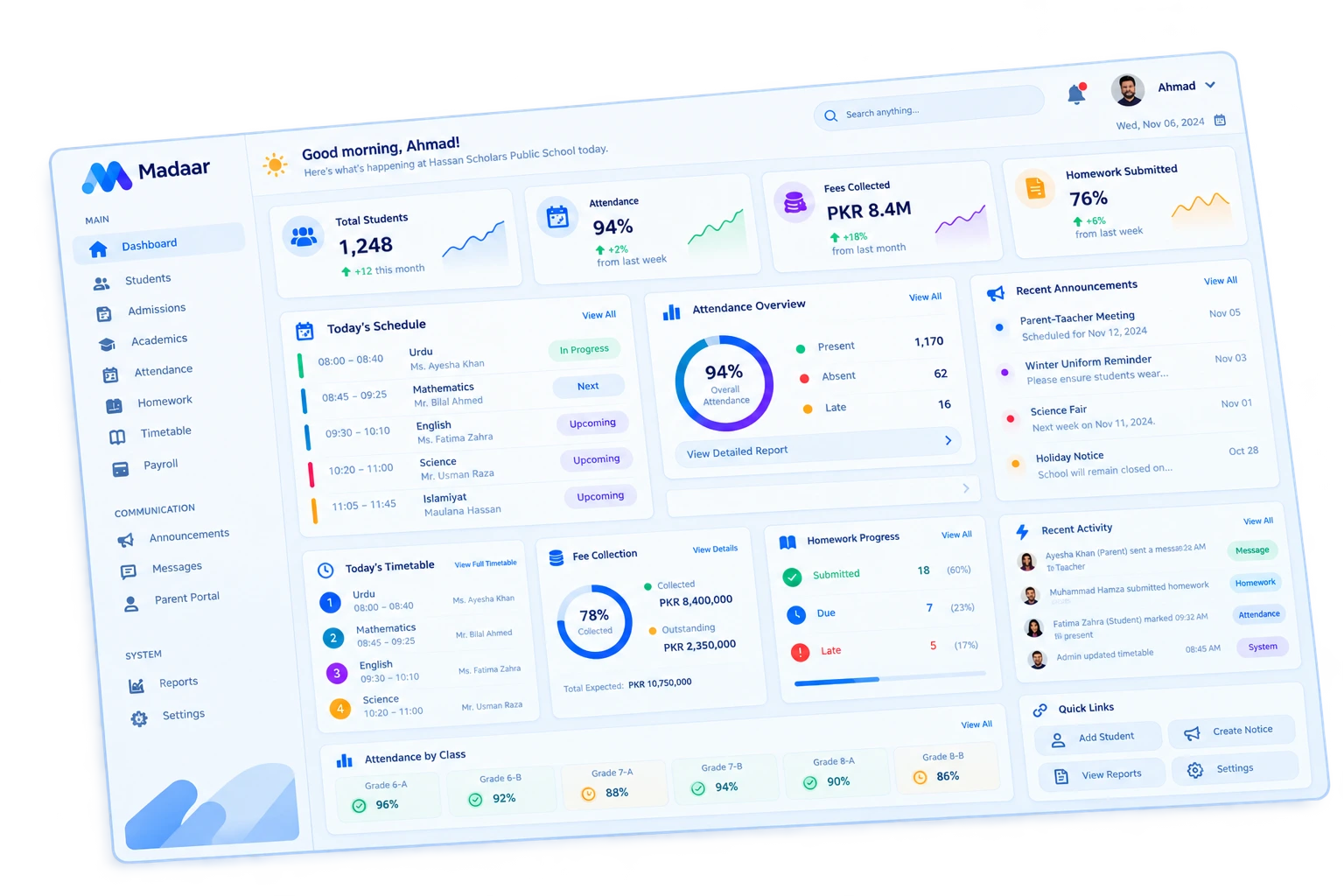
Dashboard

The campus at a glance, for the people running the day.

  • Live Campus KPIs
  • Calendar
  • Customizable Widgets

Reports

Registers and lists for students, fees, exams, and staff.

  • Students, Attendance, and Fees
  • Exams, Health, and Movements
  • Staff, Payroll, and People

Approvals

Promotions, transfers, and other changes can wait for a sign-off.

  • Promotions & Transfers
  • Other Gated Actions
  • Rules that require sign-off

Activity Log

An audit trail of changes on the campus.

  • Who Changed a Record
  • What They Changed
  • A Trail the Office Can Open

School Setup

The structure every other module hangs on.

Organization

Campuses, classes, and the people assigned to them.

  • Branches & Departments
  • Classes, Sections, and Class Teachers
  • Subjects and Subject Teachers

School Settings

How this school is named, who can do what, and which add-ons are on.

  • School Branding & Setup
  • Roles & Permissions
  • Modules per School Needs
QR code

See It On Your Campus

We'll walk through Madaar with your grades, fees, and school day.

See Madaar With Your Own Campus

Book a demo. No app-store download, no generic deck.

Book A DemoBook A Demo
Madaar workspace